If you run an MSP, you already know the documentation problem: a tech makes a firewall change at 11 PM, doesn’t document it, and three weeks later someone else is troubleshooting a routing issue with stale docs. The config in Hudu says one thing, the actual device says another.
Most teams try to solve this with process — “always update Hudu after a change.” It works for about a week. Then it quietly stops happening, and nobody notices until something breaks.
The better approach is to take humans out of the loop entirely. Every time a network device config changes, the documentation should update itself.
The Manual Documentation Problem
Here’s what the typical MSP documentation workflow looks like for network gear:
- Tech makes a change on a firewall or switch
- Tech is supposed to update the Hudu asset with what changed
- Tech forgets, or writes a vague note like “updated ACLs”
- Months pass
- Different tech troubleshoots an issue, pulls up Hudu, and finds docs from 6 months ago
- They SSH into the device and manually diff the running config against what’s documented
- They spend 30 minutes figuring out what actually changed
This happens constantly. Incomplete documentation is consistently cited as one of the top operational risks for managed service providers — and network configs are some of the worst-documented assets because changes happen frequently and often outside business hours.
What Automated Config-to-Hudu Looks Like
The goal is simple: every time a config changes on any device, a visual diff automatically appears in Hudu as an asset — no human intervention required.
Here’s the workflow:
- An agent polls your devices on a schedule (every 15 minutes, hourly, nightly — whatever you set)
- It detects changes by comparing the current config to the last known version
- Sensitive data is stripped — passwords, SNMP strings, and keys are redacted before the diff leaves your network
- A visual diff is pushed to Hudu — red/green markup showing exactly what changed, attached to the correct company and device asset
The result in Hudu looks like this:
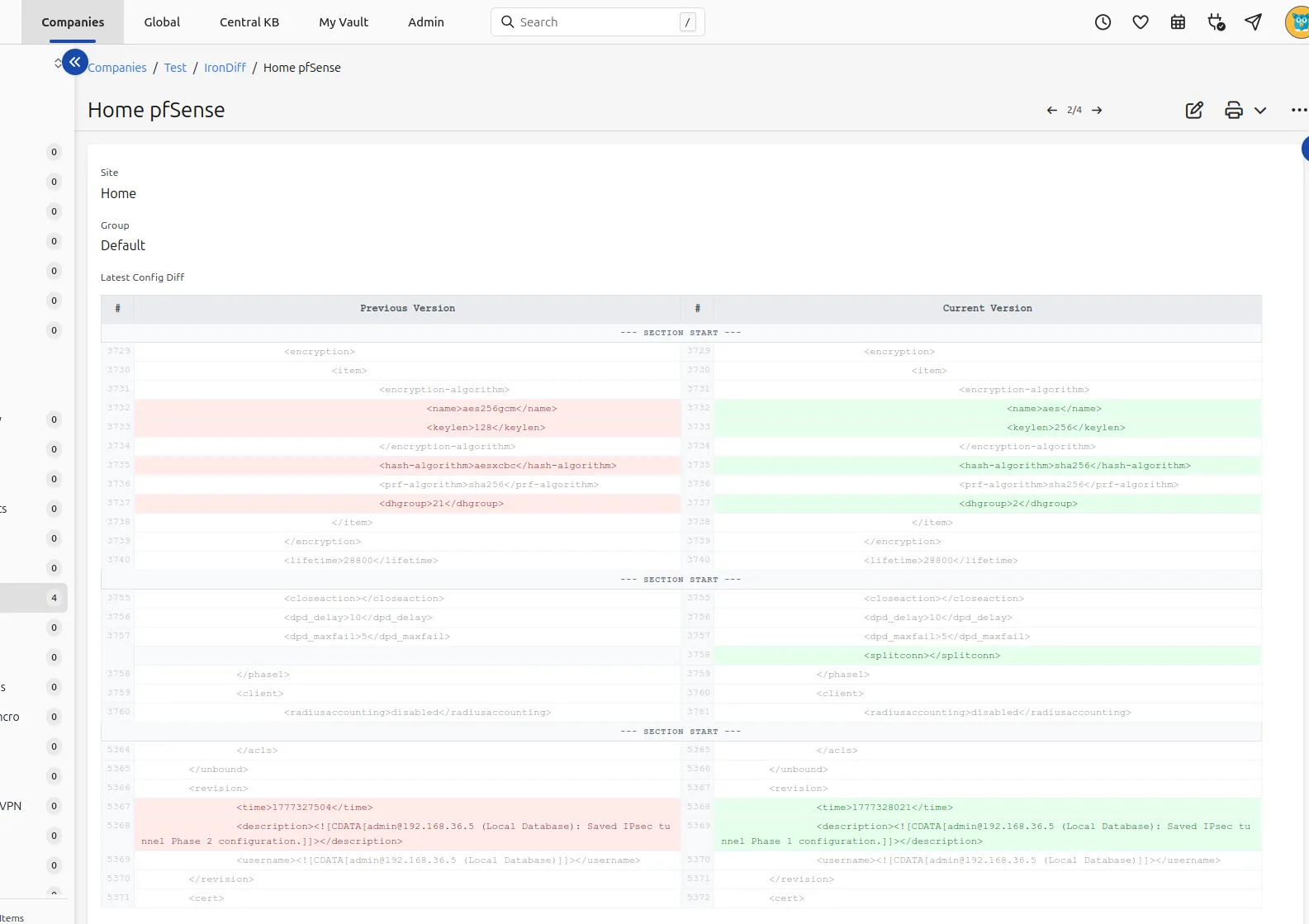
A real config diff pushed automatically to Hudu — no manual documentation required.
Every technician on your team can now open the Hudu asset for a client’s firewall and see exactly what the current config looks like, what changed, and when.
How It Works with IronDiff
IronDiff is a network configuration backup tool built specifically for MSPs. The Hudu integration is available on the Professional plan and works like this:
1. Deploy the Agent
IronDiff runs as a lightweight Docker container or a native Windows service inside your client’s network (or your central management network). It connects to devices over SSH — outbound only, no inbound firewall rules needed.
Docker:
docker run -d \
  --name irondiff \
  --restart unless-stopped \
  -p 5000:5000 \
  -v ./config:/app/config \
  -v ./data:/app/data \
  -e TZ=America/Denver \
  -e LICENSE_KEY=your-license-key \
  irondiff/irondiff --daemon
Windows: Download IronDiffAgent.exe from the portal and double-click to install, or deploy silently via RMM: .\IronDiffAgent.exe install --license-key "KEY" --silent
2. Add Your Devices
Through the local web UI at https://localhost:5000, add your switches, firewalls, and routers. IronDiff supports Cisco IOS/ASA, Aruba, pfSense, Fortigate, MikroTik, Juniper, and Netgear ProSafe.
Each device gets a Site Name (your Hudu company name) and a Group Name (location or department). These map directly to Hudu’s company structure.
3. Connect Hudu
In the IronDiff Cloud Portal, add your Hudu API credentials. IronDiff will:
- Create a dedicated Asset Layout in Hudu called “Network Config Backup” (or whatever you name it)
- Auto-map devices to Hudu companies based on the Site Name you assigned
- Push a visual diff image to the Hudu asset every time a config change is detected
4. Diffs Appear Automatically
From this point on, every config change is documented in Hudu within minutes. No tickets to create, no wiki pages to update, no “hey, did you document that change?” Slack messages.
What Gets Documented
Each Hudu asset created by IronDiff includes:
- Device name and type (e.g., “HQ-FW01 — Cisco ASA”)
- Last backup timestamp
- Visual diff — a red/green image showing exactly what lines were added, removed, or modified
- Redacted config snapshot — the full config with secrets stripped, so your team can reference it without needing SSH access
The diff image is the key piece. Instead of a text blob that nobody reads, your techs see a clear visual: red lines were removed, green lines were added. It takes 5 seconds to understand what changed.
Why Redaction Matters
A common concern with pushing configs to a documentation platform: “I don’t want passwords in Hudu.”
IronDiff handles this with a vendor-aware redaction engine that runs locally before anything is uploaded. It understands the syntax of each vendor:
- Cisco
enable secret,password 7, andkey-stringlines - pfSense sensitive XML tags (
<password>,<pre-shared-key>) - MikroTik export format secrets
- Fortigate
set password ENCblocks - SNMP community strings across all platforms
The redacted version is what appears in Hudu. Your full, unredacted config is encrypted separately with a zero-knowledge key that only your Docker agent holds — IronDiff can’t read it, and it never appears in Hudu.
The ROI for MSPs
The time savings compound quickly:
- No more manual config documentation — saves ~15 minutes per change, per device
- Faster troubleshooting — techs can check Hudu instead of SSH’ing into a device to see the current state
- Change accountability — you can see exactly when a config changed, even if nobody logged a ticket
- Client-facing evidence — during QBRs, show clients that their network is actively monitored and documented
- Onboarding new techs — new hires can review the diff history in Hudu to understand a client’s network evolution
For an MSP managing 50+ network devices across 10 clients, this typically saves 1+ hour per day in manual documentation and troubleshooting time.
Getting Started
IronDiff offers a 14-day free Professional trial that includes the Hudu integration — no credit card required. The setup takes about 5 minutes:
- Create a free account
- Deploy the Docker agent
- Add your devices
- Connect your Hudu API key
If you’re currently using Oxidized or RANCID for config backups, IronDiff can replace those while adding the documentation layer they don’t have. Check out our detailed comparison for the full breakdown.
Stop documenting configs manually.
Deploy IronDiff and let your Hudu docs update themselves.
Have questions about the Hudu integration? Email us at [email protected].